Tools built to help nonprofits fundraise in person, online, or over the phone
Raise funds or sell tickets for events and sponsorship opportunities without keeping track of cash. All directly through your trusted banking partner.






Fundraising dollars flow directly into your existing account
Autobooks is built to be part of your everyday banking experience.
Autobooks partners with banks and credit unions to offer invoicing, payment acceptance, accounting, and more, all inside online and mobile banking.

Raise funds in-person, online, or over the phone.
Flexibility matters. Share your QR code, send a Payment Link, or create a Checkout Page to make it easy to contribute. No matter where or how supporters choose to give.

Take recurring contributions and let supporters cover your fees.
Give supporters the option to set up recurring contributions and the choice to cover your card fees so you can keep more of every dollar.

Manage your nonprofit where you manage your banking.
Let your financial institution's digital banking become the hub for your nonprofit's finances, so you can track everything in one place.

Rely on a partner that understands your needs.
Finding support and guidance shouldn't be difficult. We work directly with your financial institution so you can turn to the people who know and understand your nonprofit.
Payment tools that make it easy for your supporters to give.
From one-time fundraising to registration fees and recurring commitments.

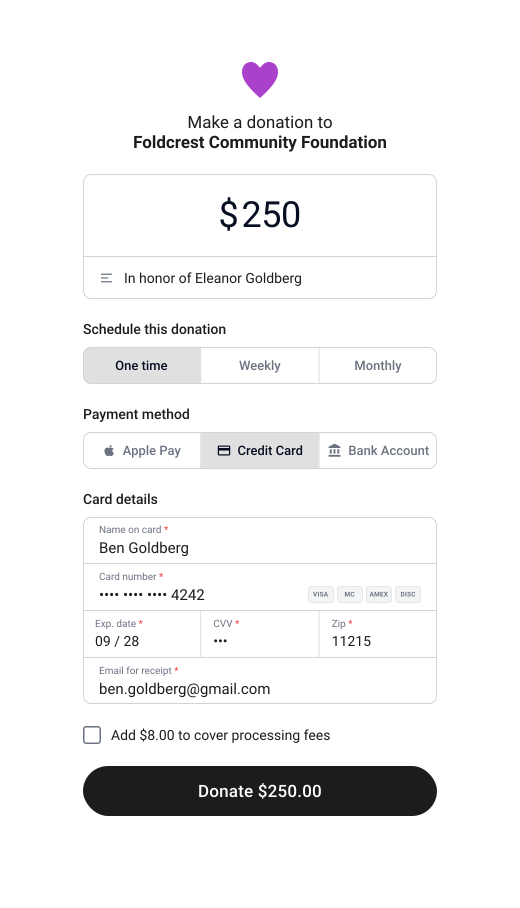
One-time fundraising
Collect funds in person, online, or over the phone.
Share your Payment Link by text or email, or key in a payment over the phone. In person, let a supporter scan your QR code or tap their card with Tap to Pay on iPhone. Tap to Pay is available at select financial institutions.
Sell tickets or offer set giving tiers
Create a Checkout Page for event tickets, sponsorships, or registration fees.
Embed it on your website or share it anywhere you communicate with supporters. No complex e-commerce setup required.
Set up recurring giving
Let supporters commit to a monthly donation.
Once it's set up, recurring donations arrive on their own. No re-sending a request every month.
Mobilize your team
Let staff and volunteers collect funds.
Add them to your Autobooks account, or get them set up with the Accept Payments by Autobooks app.
A wide range of nonprofits run on Autobooks
| Payments accepted | 500+ |
| Funds collected | $20,000+ |
| First payment | 2024 |
| Payments accepted | 800+ |
| Funds collected | $280,000+ |
| First payment | 2024 |
| Payments accepted | 2,900+ |
| Funds collected | $510,000+ |
| First payment | 2024 |
Figures shown reflect Autobooks customer activity as of July 2026 and are provided for illustrative purposes only. Individual results vary, and past activity is not a guarantee or prediction of future performance for any business.
Tap to Pay on iPhone requires a supported payment app and the latest version of iOS. Update to the latest version by going to Settings > General > Software update. Tap Download and Install. Some contactless cards may not be accepted by your payment app. Transaction limits may apply. The contactless Symbol is a trademark owned by and used with permission of EMVCo, LLC. Tap to Pay on iPhone is not available in all markets. For Tap to Pay on iPhone countries and regions, see: developer.apple.com/tap-to-pay/regions.
Apple Pay is a service provided by Apple Payments Services LLC, a subsidiary of Apple Inc. Neither Apple Inc. nor Apple Payments Services LLC is a bank. Any card used in Apple Pay is offered by the card issuer.
Managing a small business is hard.
Make it easier with Autobooks.
Add on Autobooks accounting and reporting functionality so you can focus less on finances and more on growth.
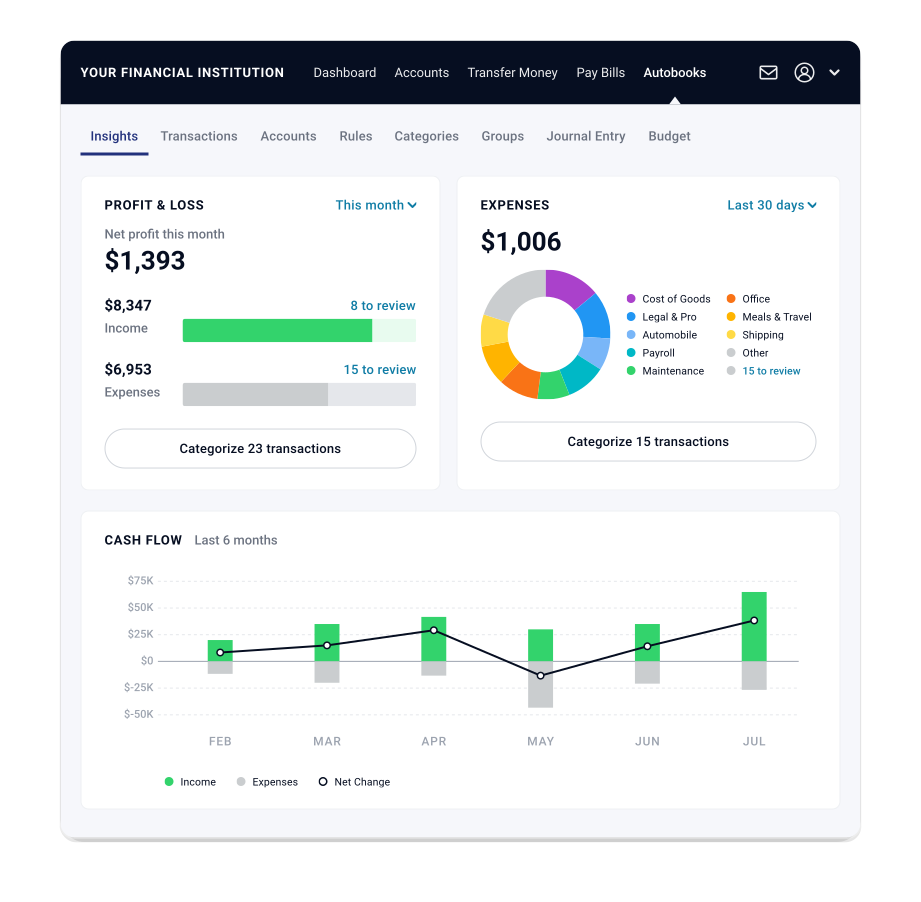
Keep track of your business directly inside of online and mobile banking, where you do everything else.
Stop having to rely on pen and paper, spreadsheets, or complicated third-party software built for accountants. Automate bookkeeping entries and access financial reports, directly inside online and mobile banking.
The ability to access Autobooks accounting and reporting can vary. Please check with your financial institution to confirm if you will have access.
Everything you can do with Autobooks
Invoicing
Send professional invoices and get paid fast.
Bulk Invoicing
Send many invoices at once in a few clicks.
Payment Links & QR Codes
Share a link or QR code to collect payment.
Checkout Pages
Give customers a simple page to pay online.
Tap to Pay
Accept card payments right on your phone.
Pay Bills
Pay vendors and schedule bills in one place.
Access Capital
Small business lending, built into your banking.
Accounting
Automated bookkeeping and financial reports.
Autobooks is offered through your bank or credit union — right inside the online banking you already use. No separate app, no new login.
Get started