Payment tools built to help you run your professional services business
Get paid, manage cash flow, and more with Autobooks. All directly through your trusted banking partner.






Get paid directly into your existing account
Autobooks is built to be part of your everyday banking experience.
Autobooks partners with banks and credit unions to offer invoicing, payment acceptance, accounting, and more, all inside online and mobile banking.

Get paid the way that works for your business.
Take deposits and upfront fees or send professional invoices with ease. When it's time to get paid, choose what works best: in person, by phone, or through text or email.

Create and save products for easy billing.
Create and save products for invoices or Checkout Pages to save time and keep pricing consistent.

Manage your business where you manage your banking.
Let your financial institution's digital banking become the hub for your small business finances, so you can track everything in one place.

Rely on a partner that understands your needs.
Finding support and guidance shouldn't be difficult. We work directly with your financial institution so you can turn to the people who know and understand your business.
Payment tools for every client relationship
Project work, recurring clients, and everything in between.

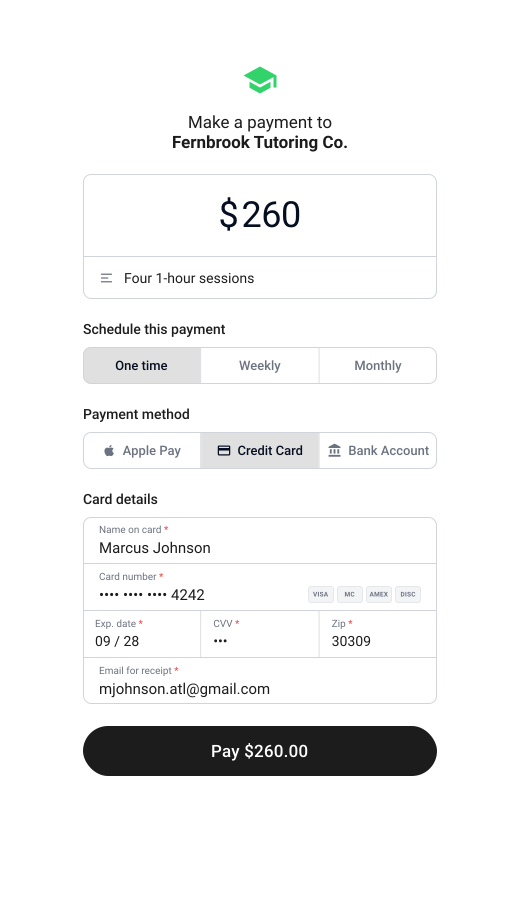
Aligning on scope
Send an estimate, and convert it to an invoice once it's approved.
Get the scope in writing: hours, deliverables, terms. Then turn it into an invoice the moment your client signs off.
When it's time to pay
Get paid in person, online, or over the phone.
Share your Payment Link by text or email, or key in a payment over the phone. In person, let a client scan your QR code or tap their card with Tap to Pay on iPhone. Tap to Pay is available at select financial institutions.
Recurring clients
Set up a recurring payment, and stop billing the same client every month by hand.
Set up a recurring invoice and Autobooks sends it automatically on your schedule. Or share your Payment Link once, and let the client choose to make it a recurring payment on their end.
Close the cash flow gap
Get capital while you wait on a client to pay.
Cover expenses between projects, or keep things running while an invoice is outstanding. Take on the next engagement without waiting for the last one to clear. Working capital is available inside your bank's digital banking, informed by how your business actually operates. Lending is available at select financial institutions.
A wide range of professional services businesses run on Autobooks
Figures shown reflect Autobooks customer activity as of July 2026 and are provided for illustrative purposes only. Individual results vary, and past activity is not a guarantee or prediction of future performance for any business.
Tap to Pay on iPhone requires a supported payment app and the latest version of iOS. Update to the latest version by going to Settings > General > Software update. Tap Download and Install. Some contactless cards may not be accepted by your payment app. Transaction limits may apply. The contactless Symbol is a trademark owned by and used with permission of EMVCo, LLC. Tap to Pay on iPhone is not available in all markets. For Tap to Pay on iPhone countries and regions, see: developer.apple.com/tap-to-pay/regions.
Apple Pay is a service provided by Apple Payments Services LLC, a subsidiary of Apple Inc. Neither Apple Inc. nor Apple Payments Services LLC is a bank. Any card used in Apple Pay is offered by the card issuer.
Managing a small business is hard.
Make it easier with Autobooks.
Add on Autobooks accounting and reporting functionality so you can focus less on finances and more on growth.
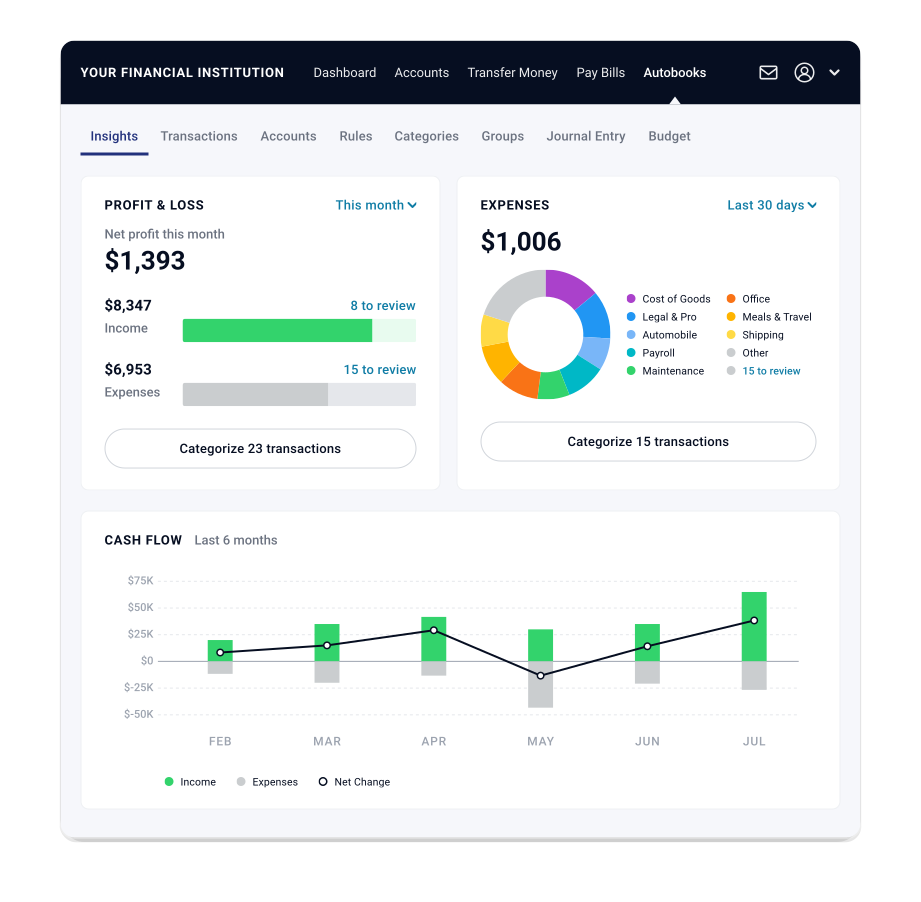
Keep track of your business directly inside of online and mobile banking, where you do everything else.
Stop having to rely on pen and paper, spreadsheets, or complicated third-party software built for accountants. Automate bookkeeping entries and access financial reports, directly inside online and mobile banking.
The ability to access Autobooks accounting and reporting can vary. Please check with your financial institution to confirm if you will have access.
Everything you can do with Autobooks
Invoicing
Send professional invoices and get paid fast.
Bulk Invoicing
Send many invoices at once in a few clicks.
Payment Links & QR Codes
Share a link or QR code to collect payment.
Checkout Pages
Give customers a simple page to pay online.
Tap to Pay
Accept card payments right on your phone.
Pay Bills
Pay vendors and schedule bills in one place.
Access Capital
Small business lending, built into your banking.
Accounting
Automated bookkeeping and financial reports.
Autobooks is offered through your bank or credit union — right inside the online banking you already use. No separate app, no new login.
Get started