Payment tools built for how you work
Send invoices, or get paid in person, online, or over the phone. No new app, no new login. It's already part of the account you use today.






No guesswork.
Just the tools you need to get paid.
Every payment settles directly in your bank account, no matter how it came in.
In Person
Get paid on the spot, no card reader needed
Accept contactless payments via card or digital wallet using Tap to Pay on iPhone, or let your customer scan your Payment Link QR code. Tap to Pay is available at select financial institutions.
From anywhere
Get paid from anywhere, on their schedule
Share your Payment Link by text or email. Your customer pays by card, ACH, or Apple Pay. No app to download on either side.
By Phone
Take a payment yourself, right over the phone
When a customer calls ready to pay, enter their payment details on their behalf directly from your bank account. No separate terminal needed.
Online Invoicing
Send a professional invoice and get paid online
Create an invoice with your line items and a due date, then send it by email. Your customer pays online by card or bank transfer.
Billing At Volume
Bill your whole customer list in one batch
Use Bulk invoicing to import a billing list from a spreadsheet, review it, and send dozens or hundreds of invoices at once. Bulk Invoicing is available at select financial institutions.
Checkout Pages
Sell online without a complex e-commerce setup
Build a simple checkout page inside your account and share it by link or QR code. Add your product, set your pricing, and include a quantity limit so sales stop automatically when you're sold out.
Tap to Pay on iPhone requires a supported payment app and the latest version of iOS. Update to the latest version by going to Settings > General > Software update. Tap Download and Install. Some contactless cards may not be accepted by your payment app. Transaction limits may apply. The contactless Symbol is a trademark owned by and used with permission of EMVCo, LLC. Tap to Pay on iPhone is not available in all markets. For Tap to Pay on iPhone countries and regions, see: developer.apple.com/tap-to-pay/regions.
Apple Pay is a service provided by Apple Payments Services LLC, a subsidiary of Apple Inc. Neither Apple Inc. nor Apple Payments Services LLC is a bank. Any card used in Apple Pay is offered by the card issuer.
See how this works for your industry
Every business collects payment a little differently. See scenarios built around yours.
Construction & Trades
Professional Services
Property Services
Nonprofits
Track every payment in the same place
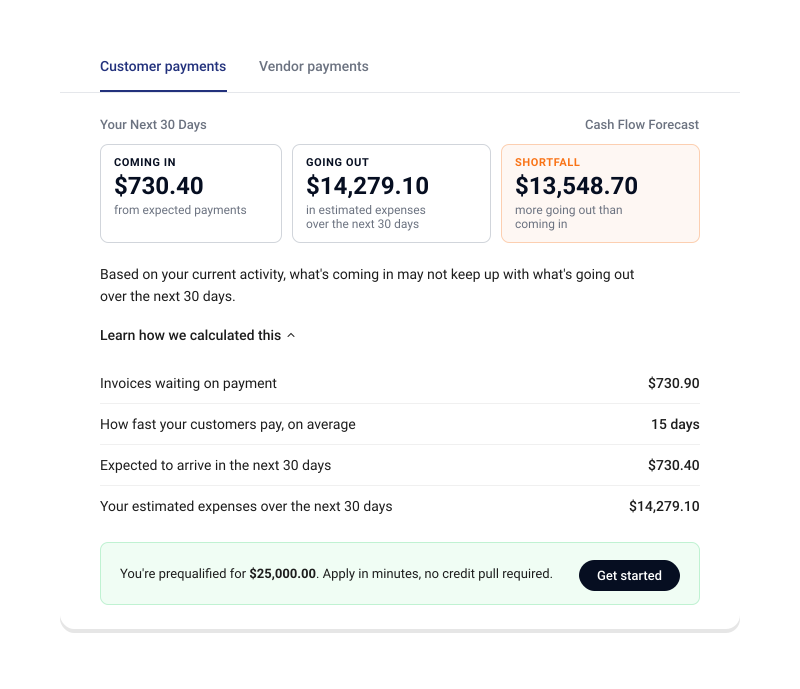
However you get paid, it lands right next to your bills and your bank balance, no checking multiple tools to see where things stand. The connected system tracks what's coming in, what's going out, and what's already in your account, then surfaces what needs your attention: a heads-up before a shortfall, a nudge on a late payment, a real-time picture instead of a monthly guess.
When offered by your bank, add Autobooks bill pay, accounting, and lending, and your balance gets smarter. Disconnected tools can't give you that.
Frequently asked questions
How can I get paid in person or when I'm with a customer?
How can I get paid in person or when I'm with a customer?
Tap a customer's contactless card or digital wallet right on an eligible iPhone with Tap to Pay, no card reader needed. Or display your Payment Link QR code so they can scan it and pay by card, ACH, or Apple Pay.
How can I get paid if I can't meet my customer in person?
How can I get paid if I can't meet my customer in person?
Share your Payment Link by text or email. Your customer pays by card, ACH, or Apple Pay.
Can I enter payment details on behalf of my customer?
Can I enter payment details on behalf of my customer?
Yes. When a customer calls ready to pay, enter their payment details yourself, right from your account. No separate terminal needed.
Do I need separate software to send invoices?
Do I need separate software to send invoices?
No. Invoicing lives inside your bank's digital banking, the same place you're already managing everything else. No new app, no new login.
Can I invoice all of my customers at once?
Can I invoice all of my customers at once?
Yes. Import your billing list, review it, and send dozens or hundreds of invoices in one batch. Bulk invoicing is available at select financial institutions.
Ready to start collecting payments today?
Log into your bank's digital banking to set up the payment tools that fit how you work.